
A stage-by-stage guide for small business owners, DIY advertisers, and the people managing their Google Ads accounts.
by Chris Sheehy
-
Google's optimization score looks like a performance gauge. It isn't. It measures how closely your account follows Google's recommendations — and those recommendations are designed to increase spend, expand reach, and push automation, not necessarily to improve your bottom line.
Most of the 20 auto-apply recommendations covered here fall into one of four buckets: always on, always off, right only at a specific account stage, or only with conditions Google never mentions. For micro- and small-business accounts spending under $1,000 a month in competitive local or regional markets, the defaults lean too aggressive, too early.
The short version: keep manual control in the first six months, let Maximize Clicks with a Max CPC cap do the heavy lifting until conversions are confirmed, and don't let the score — or the rep calling about it — talk you into automation the account hasn't earned yet.
The full breakdown, with stage-by-stage guidance for every recommendation, is in the article. The reference matrix is downloadable below.Description text goes here
If you've spent any time managing Google Ads, you've seen the setup - a percentage at the top of the screen, a list of recommended changes underneath it, and some version of the same message coming at you from different directions. Sometimes it's an email from Google. Sometimes it's a call from a rep. Sometimes it's the person managing the account telling you there are quick wins sitting in the Recommendations tab that could improve performance.
If you're a business owner, the reaction is understandable. Google built the thing, the interface is telling you these changes will help, and everyone around the account seems to be pointing in the same direction, so of course the next question is, why wouldn't I do this? If you're managing the account yourself, the pressure feels a little different but lands in almost the same place. You don't want to ignore something useful, but you also don't want to click "apply" on a recommendation that looks smart in the dashboard and ends up sending your limited budget off in exactly the wrong direction.
And if you're the PPC manager on the account, whether you're freelance, agency-side, or wearing six hats inside a small business, you've probably had some version of this conversation already. Google wants changes. The optimization score says there is room to improve. The client sees a number that isn't 100%. Now somebody has to decide which suggestions are genuinely helpful, which ones are harmless noise, and which ones are really just spend expansion dressed up as optimization.
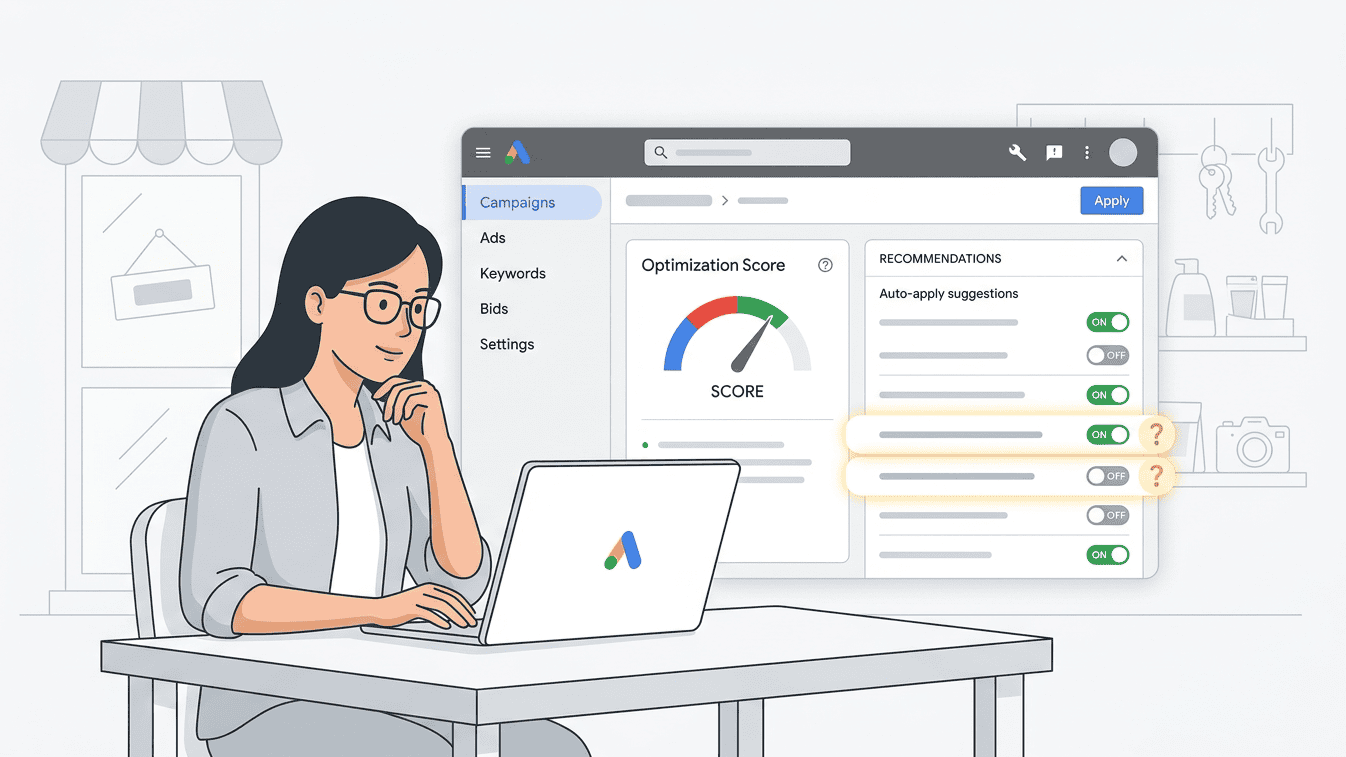
That's what this article is about.
The point is not to help you get a feel-good optimization score. The point is to help you make better decisions about Google's auto-apply recommendations based on the kind of account you actually have, the amount of data it has earned, and the amount of risk the business can realistically afford to take. For a small business, those things matter more than a badge in the interface ever will.
If some of the terminology here is unfamiliar, there is a glossary at the bottom of the article. Use it. This piece is meant to be useful to business owners trying to understand what their PPC contractor is doing, DIY advertisers trying not to learn everything the expensive way, and PPC managers looking for a practical benchmark for small-budget accounts.
While automated ad scripts try to maximize spend, sustainable growth requires aligning paid campaigns with organic search visibility. Our Rhode Island SEO services ensure your business owns both paid search and organic search results without relying on automated platform algorithms.
A big part of the confusion starts with the optimization score itself. Google ties that score directly to its recommendation system, which means the number tends to rise when recommended changes are accepted or dismissed in ways the platform likes. In plain English, the score is closely tied to recommendation compliance, not just to business performance, and those are not the same thing.
In that sense, the optimization score works a lot like gamification. You get a visible target, a list of actions that will move the number upward, and a built-in sense that progress is happening when the score improves, even though the real-world outcome may simply be closer alignment with Google's preferred settings, more automation, or broader reach. That's not automatically bad, but it is worth understanding for what it is.
It also explains why Google reps, outsourced account managers, and well-meaning PPC vendors can end up sounding an awful lot alike. In many cases, they're looking at the same score, the same prompts, the same recommendation categories, and the same pressure to improve the number. Sometimes the guidance is thoughtful and grounded in the account. Sometimes it's the Recommendations tab being read back to the business in sentence form.
None of that means the Recommendations tab is useless. Some suggestions are solid. Some are neutral. Some are good only at a certain point in the life of the account, and a few should stay off no matter how often Google brings them back. The hard part is not finding the recommendations. Google makes those impossible to miss. The hard part is knowing when they fit, when they don't, and when the account simply hasn't earned the right to act on them yet.
That's the lens for everything that follows. This guide is based on Omni Search Labs' experience with micro- and small-business Google Ads accounts, especially local to regional campaigns in competitive markets with monthly budgets under $1,000. That scope matters. A manager working on a national e-commerce account, or on a brand with deep budget and strong conversion volume, may make different calls. For the kind of accounts discussed here, though, these are strong benchmarks to start from.
I've been managing Google Ads accounts since the platform launched in 2000, and the one constant across all those years is that platforms are very good at suggesting change long before the account has enough context to make the change wisely. The interface has gotten smoother, the automation has gotten smarter, and the language around recommendations has gotten more polished. The need for judgment hasn't gone anywhere.
Applying the Why, How, What framework:
Why this article exists: small business advertisers need a practical way to tell the difference between useful automation and expensive automation.
How this article handles it: by sorting Google's major auto-apply recommendations by account stage instead of pretending every recommendation is universally right or universally wrong.
What this article gives you: a working benchmark for what to enable, what to review manually, what to leave off, and when.
The Four Account Stages
Before you can make sense of any of these recommendations, you need a framework for where the account actually is. Google doesn't care much about that distinction because the recommendation engine is always trying to move the account toward its preferred version of progress. In the real world, though, a recommendation that is reasonable in a larger-budget or mature account can be premature, wasteful, or flat-out wrong in a new account with a modest budget.
This is the four-stage model I use every time I look at a small-business account.
Stage 0 -- New (0-90 days): The account is still learning from its initial learning, and in some cases the learning curve is going to be longer than expected because there just hasn't been enough ad impression, interactions, and conversion volume yet. You're collecting search term data, finding obvious waste, figuring out whether the landing page is doing its job, and watching how the market responds to the offer. This is not the time to get clever with automation. It's the time to stay close to the controls and learn what kind of traffic you're actually paying for.
Stage 1 -- Early (90-180 days): By this point, you usually have enough information (data) to start seeing patterns. Certain keywords are proving themselves. Others aren't. Negative themes begin to emerge. Messaging starts to show its strengths and weaknesses. Some automation can begin to make sense here, but only in narrow areas and only when the account has actually produced enough evidence to justify it.
Stage 2 -- Growing (180-365 days): Now you're moving out of the pure learning phase and into a more informed testing phase. This is where some conversion-based bidding strategies, selective expansion tools, and more advanced automation start to become worth evaluating, assuming the conversion volume and lead quality back up the decision.
Stage 3 -- Mature (12+ months): At this point, the account has history. That doesn't mean Google suddenly becomes trustworthy across the board, and it definitely doesn't mean every recommendation becomes a good idea. What it does mean is that certain forms of automation have finally earned the right to be considered because the account has enough context behind it to support better machine decisions.
One thing worth calling out here, because it can look odd in the matrix at first glance: Stage 0 and Stage 1 sometimes appear more similar than people expect. That's because the label in the matrix is only part of the story. The bigger change between those stages is the quality of the evidence behind the decision. In Stage 0, a "Review" often means "not yet." In Stage 1, that same "Review" may finally mean "you've got enough data to make the call." More data doesn't guarantee better decisions, but it gives you a much better shot at making the right one. Less data often means the smartest move is to wait.
Everything below is built around that logic.
The Recommendations
Use Optimized Ad Rotation
Google's Pitch: "Automatically show your best ads at auction time."
Chris's Take: If there's only one responsive search ad, or RSA, in the ad group, this barely matters. Google is already rotating headlines and descriptions at the asset level. If you have multiple RSAs or mixed ad types in the same group, it matters more. Even then, on a small budget, you don't have much room to keep feeding weaker ads.
The Fine Print: The risk here is not huge, but it exists. With low traffic, Google can decide it has a winner before there's enough data to trust the result. Even so, because RSAs handle most of the ad assembly internally now, the old ad-rotation debate matters less than it used to.
Stage Guidance: New (Enable) · Early (Enable) · Growing (Enable) · Mature (Enable)
Improve Your Responsive Search Ads (Ad Suggestions)
Google's Pitch: "Get more clicks on your responsive search ads by improving your headlines and descriptions. Content will come from your existing content including your ad's final URL or assets in the same ad group."
Chris's Take: This is useful only when the RSA is incomplete. If the ad still needs more headlines or descriptions, it can help fill in blanks. Once the ad is properly built, turn it off. Google's suggestions often pull language that is adjacent to your message without actually supporting it.
The Fine Print: This is one of the few areas where auto-apply can help briefly if someone is paying attention. The catch is that someone actually has to be paying attention. If nobody is reviewing the suggestions before they go live, you're letting Google rewrite your ad copy based on page content and pattern matching.
Stage Guidance: New (Review) · Early (Review) · Growing (Off) · Mature (Off)
Remove Redundant Keywords
Google's Pitch: "Make your account easier to manage by removing redundant keywords."
Chris's Take: This sounds cleaner than it really is. Google's definition of redundant usually means one keyword is technically covered by another match type. That's not always the same as saying the extra keyword has no value.
The Fine Print: Exact match, phrase match, intent control, bidding flexibility, and reporting structure all matter. A keyword can look redundant to Google's system and still be strategically useful in the account.
Stage Guidance: New (Off) · Early (Off) · Growing (Review) · Mature (Review)
Remove Non-Serving Keywords
Google's Pitch: "Make your account easier to manage by removing non-serving keywords."
Chris's Take: On older accounts with years of buildup, cleanup can make sense. On small accounts still trying to find their footing, this is usually too aggressive.
The Fine Print: A quiet keyword is not necessarily a bad keyword. Search behavior changes. Competition changes. CPCs change. Quality Score changes. A keyword that has not served yet may still matter later. For small accounts, keeping it often costs less than removing it and having to rethink the structure later.
Stage Guidance: New (Off) · Early (Off) · Growing (Review) · Mature (Review)
Remove Conflicting Negative Keywords
Google's Pitch: "People didn't see your ads because of conflicting negative keywords. Remove them so your ads can show."
Chris's Take: Do not auto-apply this.
The Fine Print: Some negative conflicts are genuine mistakes. Others are deliberate controls put there to stop junk traffic. Google's bias here is simple: if the conflict is removed, more ads can show. That may help. It may also undo a good filter. This needs human review every time.
Stage Guidance: New (Off) · Early (Off) · Growing (Off) · Mature (Off)
Use Optimized Targeting
Google's Pitch: "Get more conversions at a similar cost per conversion."
Chris's Take: This is one of those recommendations that sounds more precise than it is. In mature accounts with strong data, it may have a place. In small local campaigns, it can quietly widen the funnel in ways the advertiser did not intend.
The Fine Print: If the campaign is meant to drive location targeted leads (geo-fencing), there is no business value in letting the platform decide that nearby states look close enough. Until the account has real conversion signal, optimized targeting is still leaning on proxy behavior.
Stage Guidance: New (Off) · Early (Off) · Growing (Review) · Mature (Consider)
Upgrade Your Conversion Tracking (Data-Driven Attribution)
Google's Pitch: "Give credit for conversions across multiple ad interactions with data-driven attribution."
Chris's Take: This is one of the better recommendations in the bunch. If the account is still on last-click attribution, moving to data-driven attribution is usually the right long-term setup.
The Fine Print: Data-driven attribution, often shortened to DDA, gives credit across the ad interactions that helped produce a conversion instead of assigning all credit to the final click. On very small accounts, the day-to-day impact may be limited at first because Google still needs enough data to fully activate the model. Even so, this is one of the safer infrastructure changes you can make early.
Stage Guidance: New (Enable) · Early (Enable) · Growing (Enable) · Mature (Enable)
Bid More Efficiently with Target Impression Share
Google's Pitch: "Optimize for your ads' visibility with a fully automated bid strategy."
Chris's Take: There is a narrow use case here, and it's usually brand defense. If a competitor is actively bidding on your name, this can have a purpose. As a general lead-gen bidding strategy for small businesses, I rarely like it.
The Fine Print: This is not an efficiency strategy. It's a visibility strategy. You're telling Google to chase presence, not necessarily results. That can make sense in a dedicated brand campaign with its own budget. It usually does not make sense in a regular small-business search campaign where every click has to earn its keep.
Stage Guidance: New (Off) · Early (Off) · Growing (Consider -- brand campaign only) · Mature (Consider -- brand campaign only)
Bid More Efficiently with Maximize Clicks
Google's Pitch: "Get more clicks at a similar cost with a fully automated bid strategy."
Chris's Take: This has been one of my preferred starting points for campaigns of all sizes for years - at least for the first 90-days. for years. Maximize Clicks with a Max CPC cap is a practical starting strategy for new accounts and for campaigns that haven't built enough conversion data to support smarter bidding - or won’t hit the monthly conversion requirement for using a smart bidding campaign (which are many successful small businesses).
The Fine Print: What I like here is the relative simplicity. The system is optimizing for clicks, not trying to infer conversion quality from thin signal. A Max CPC cap is the limit you place on what Google can bid for a click while using the Maximize Clicks strategy. Without it, the platform will keep trying to get more clicks while spending the budget, and CPCs can drift higher than the account should tolerate.
Why this matters for small accounts: Maximize Clicks with a Max CPC cap should not be treated like a lesser strategy. In many small accounts, it is the right strategy because it matches the amount of data the account actually has.
Stage Guidance: New (Enable) · Early (Enable) · Growing (Review) · Mature (Review)
Bid More Efficiently with Maximize Conversions
Google's Pitch: "Get more conversions at a similar cost with a fully automated bid strategy."
Chris's Take: This works when there is enough real conversion data to support it. Without that, it's often too early.
The Fine Print: This is where a lot of small advertisers get nudged forward before the account is ready. Under roughly 30 to 50 conversions per month, the system is still working with limited evidence. It can make the campaign look more advanced without actually making it better.
Stage Guidance: New (Off) · Early (Off) · Growing (Review -- if conversion threshold met) · Mature (Consider)
Bid More Efficiently with Maximize Conversion Value
Google's Pitch: "Get more conversion value at a similar cost with a value-based bidding strategy."
Chris's Take: This is only as good as the values you feed it. For many service businesses, that means doing actual business math before turning it on.
The Fine Print: If you know average project value and real close rate from paid leads, you can start assigning value in a meaningful way. If you don't, Google is left to optimize toward whatever conversion event is easiest to chase. That's not what most small businesses want.
Stage Guidance: New (Off) · Early (Off) · Growing (Review -- with assigned conversion values) · Mature (Consider)
Bid More Efficiently with Maximize Conversions Using a Target CPA
Google's Pitch: "Get more conversions at a lower or similar CPA with a fully automated bid strategy."
Chris's Take: This introduces one more variable on top of Maximize Conversions: your CPA target has to be grounded in reality.
The Fine Print: CPA means cost per acquisition or cost per lead, depending on how the account is set up. If the business can afford $400 to acquire a new customer and the campaign is being told to hold the line at $90, the problem is not necessarily the bidding strategy. The problem may be the target.
Stage Guidance: New (Off) · Early (Off) · Growing (Review -- with CPA formula established) · Mature (Consider)
Bid More Efficiently with Maximize Conversion Value Using a Target ROAS
Google's Pitch: "Get more conversion value at a similar ROAS with a value-based bidding strategy."
Chris's Take: This is a much better fit for e-commerce than for most local service businesses.
The Fine Print: ROAS means return on ad spend. If the transaction happens online and the revenue is immediate, ROAS is easier to trust. If the lead comes in today and the deal closes 45 days later, real-time ROAS can be misleading. That doesn't make it useless. It just means most small service accounts are not ready for it as early as Google would like.
Stage Guidance: New (Off) · Early (Off) · Growing (Off) · Mature (Review -- e-commerce or established close rate data required)
Set a Target CPA / Adjust Your CPA Targets
Google's Pitch: "Get more conversions at a similar CPA by setting a target." / "Get more conversions by adjusting your CPA targets."
Chris's Take: This recommendation often shows up before the business has earned the right to act on it.
The Fine Print: If you're already hitting lead goals, running below target CPA, and still leaving budget on the table, then loosening the target may make sense. If not, this is often just a spend increase wearing an optimization badge.
Stage Guidance: New (Off) · Early (Off) · Growing (Review -- all three conditions required) · Mature (Consider)
Set a Target ROAS / Adjust Your ROAS Targets
Google's Pitch: "Get more conversion value at a similar ROAS by setting a target." / "Get more conversion value by adjusting your ROAS targets."
Chris's Take: Same general rule as CPA targets: don't adjust what you haven't validated.
The Fine Print: In mature accounts with strong revenue data, this can be worth reviewing. In newer or thinner accounts, the data behind it is often not solid enough to justify a change. Before touching the target, make sure the values, attribution, and time lag all make sense.
Stage Guidance: New (Off) · Early (Off) · Growing (Off) · Mature (Review)
Add New Keywords (Auto-Apply)
Google's Pitch: "Show your ads more often to people searching for what your business offers."
Chris's Take: This is one of the easiest ways to loosen a small account until it stops behaving like the account you intended to build.
The Fine Print: Google's keyword suggestions often lean toward higher-volume ideas that are loosely relevant, not tightly aligned to local intent and budget discipline of micro-small businesses. For these accounts, every added keyword competes for the same finite spend. Review manually. Add sparingly.
Stage Guidance: New (Off) · Early (Off) · Growing (Review -- manual only) · Mature (Review -- manual only)
Add Broad Match Keywords
Google's Pitch: "Get more conversions at a similar or better ROI by adding broad match versions of your existing keywords."
Chris's Take: Broad match can work. It just usually asks for more control, more cleanup, and more budget tolerance than small accounts have.
The Fine Print: To make broad match useful, you need strong negative keyword management (negatives stop your ads from displaying), active search term monitoring, and the willingness to keep refining. That's not impossible. It's just not lightweight. For a lot of micro-small businesses, the management cost alone makes it the wrong recommendation to auto-apply.
Stage Guidance: New (Off) · Early (Off) · Growing (Review -- with established negative keyword library) · Mature (Consider -- with active search term monitoring)
Use Display Expansion / Expand to Search Partners
Google's Pitch: "Get more conversions at a similar CPA using unspent budget with the revamped Google Display Network Expansion feature."
Chris's Take: I have rarely seen this improve lead quality for the kinds of small local campaigns discussed in this article.
The Fine Print: Search Partners and Display Expansion can broaden reach, but they also tend to dilute intent. If your budget is limited and the campaign's job is to drive qualified local leads, the safer path is usually to keep Search tight. If you want Display, build Display on purpose. Don't let it sneak in through a recommendation.
Stage Guidance: New (Off) · Early (Off) · Growing (Off -- consider dedicated Display campaign instead) · Mature (Off -- consider dedicated Display campaign instead)
Dynamic Search Ads (DSA)
Google's Pitch: DSA generates headlines from your site content algorithmically, automatically matching ads to relevant queries.
Chris's Take: This can look like a shortcut, especially to smaller advertisers trying to save time. Sometimes it helps. Often it hands too much control to the system too early.
The Fine Print: DSA has legitimate uses on larger sites, broad inventories, and accounts with real content gaps. For a focused service business, though, a clean RSA structure with controlled keywords and intentional landing pages is usually the better tool.
Stage Guidance: New (Off) · Early (Off) · Growing (Review -- large sites with content gaps only) · Mature (Review -- large sites with content gaps only)
Add Store Visits as an Account Default Goal
Google's Pitch: "Grow total conversions and value with Smart Bidding and store visits."
Chris's Take: This is tempting for location-based businesses, but it can quickly turn into a vanity metric if store visits do not map cleanly to revenue.
The Fine Print: For some brick-and-mortar businesses, store visits are meaningful. For others, they inflate performance with estimated traffic that does not create measurable business value. Before turning this on, ask a simple question: if someone visits and does not buy, book, or become a real lead, did that visit help enough to deserve optimization weight? If your foot-traffic sales conversion is high - consider turning this ON, otherwise, leave it OFF.
Stage Guidance: New (Off) · Early (Off) · Growing (Review -- brick-and-mortar with traffic-to-revenue correlation only) · Mature (Consider -- brick-and-mortar with traffic-to-revenue correlation only)
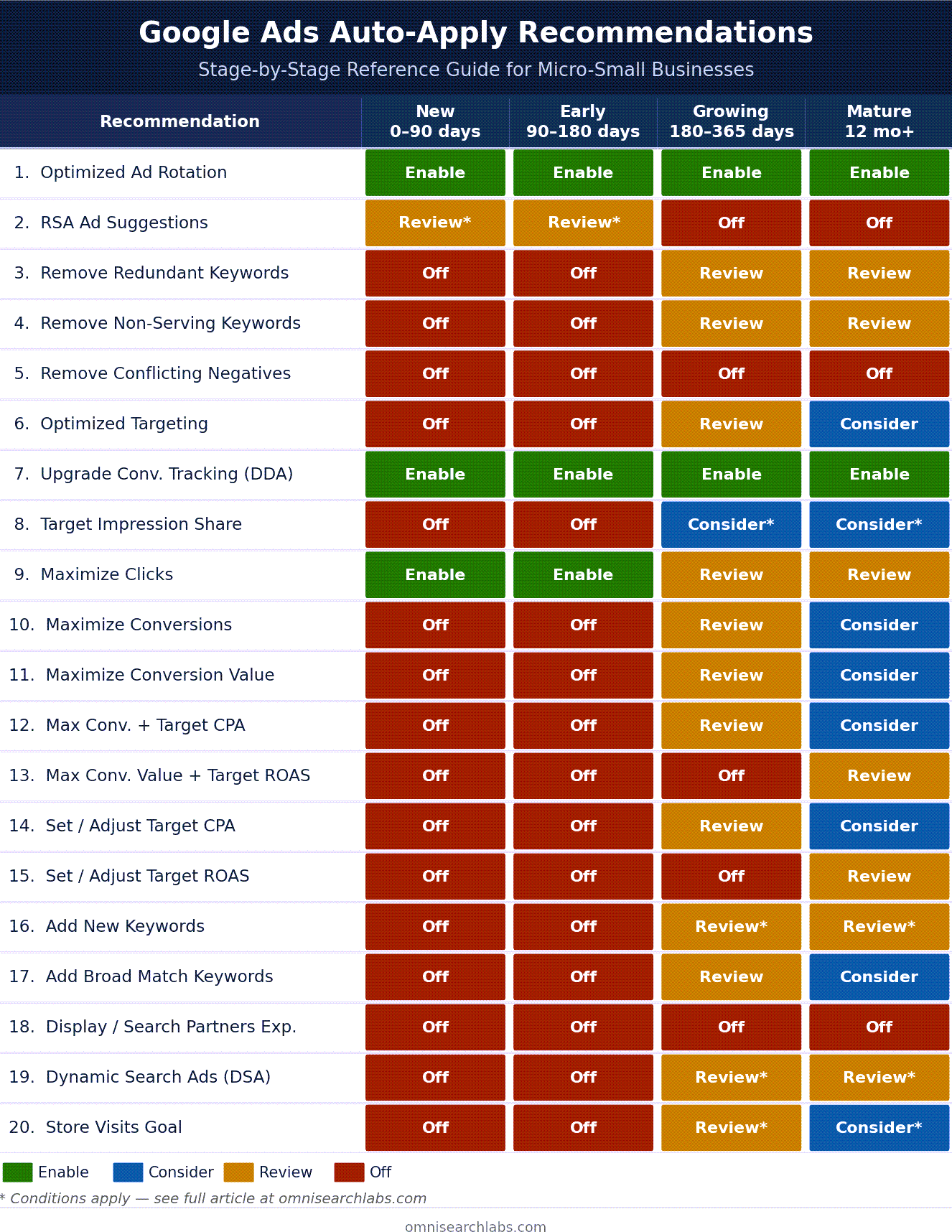
Download & Print! Note: the difference between the 0–90 and 90–180-day marks are the degree to which incoming data impacts ad performance.
The Smart Bidding Reality Check for Micro-Small Accounts
Back in the early AdWords era, people used to talk about a 90-day rule, as if the calendar itself had some magical authority. It didn't. The real issue was always data. Small accounts needed time to collect enough search term history, click behavior, and conversion signal to support decisions that were based on more than gut instinct and platform optimism.
That basic truth hasn't changed, even if the interface has. For many small accounts, the practical threshold for conversion-based Smart Bidding is roughly 30 to 50 conversions per month. Below that, the system is still trying to make confident decisions with limited evidence, which is another way of saying it's filling gaps with probabilities and proxy signals. Sometimes that works well enough. Sometimes it doesn't. On a tight budget, "doesn't" gets expensive quickly.
That's why Maximize Clicks with a Max CPC cap should not be treated like a lesser strategy or a consolation prize for accounts that haven't graduated to something more sophisticated. In many micro- and small-business accounts, it is the right strategy precisely because it matches the amount of data the account actually has. It's transparent, it's easier to control, and it tends to do less damage than conversion-based bidding that's trying to read too much into too little signal.
What usually works best is a progression that the account earns, rather than one Google keeps nudging you toward because the recommendation engine is impatient.
Start with Maximize Clicks plus a Max CPC cap. This gives Google room to find traffic while keeping click costs inside a range the business can live with.
Move to Maximize Conversions only after the account is generating at least 30 conversions per month for 60 consecutive days. If this never happens - it wont for many - stick with #1 and you’ll still be in good shape. At that point, the system has enough real conversion history to work from instead of leaning so heavily on proxies.
Add a Target CPA only after Maximize Conversions is stable. Now you're refining a strategy that has already shown it can work instead of forcing a fragile account to obey a target it hasn't earned.
Use Target ROAS only when revenue tracking is strong enough to support it. For many service businesses, that means later than Google would like, because real revenue often trails the lead by weeks or months.
Skipping steps rarely saves time. Usually it just moves the failure point closer and makes the account harder to diagnose when performance starts slipping.
What Should You Actually Spend?
Every PPC manager gets asked some version of the same question: what's the right budget? The honest answer is that there isn't one number that works across the board, because the right budget depends on the market, the CPCs, the landing page conversion rate, the target CPL, how many leads the business can realistically handle and close, and how much volatility the business can tolerate while the account is learning.
That last piece matters more than a lot of advertisers admit. Two businesses can have the same market, the same target CPL, and the same budget on paper, but very different tolerance for risk. One may be able to absorb a couple of inefficient months while the account settles in. Another may need the campaign to stay tight from day one because one bad month affects payroll, cash flow, or owner stress in a real way. Risk tolerance should shape how aggressively you test bidding strategies, match types, targeting expansion, and budget increases.
The basic budget-floor formula is simple enough: target leads per month multiplied by target cost per lead. If you want 10 leads a month and your target CPL is $60, then $600 a month is the starting floor. Whether that floor is realistic depends on what it actually costs to buy traffic in the market and how efficiently the site turns that traffic into leads.
That's why budget planning is never just a traffic exercise. It's business math. A landing page converting at 5% with $3 clicks tells a very different story from a landing page converting at 1% with $6 clicks, even if the budget sounds reasonable in both cases. The number itself doesn't tell the whole story. The surrounding economics do.
Google's budget recommendations don't know your staffing limits, your gross margin, your close rate, or how painful a wasted month feels when you're a small business owner writing the checks yourself. They are based on campaign activity and auction opportunity, which can be useful context, but they are not the same thing as an affordable budget. Build the number from your business first. Then let the platform work inside it.
Small budgets can drive meaningful revenue and business growth. However, they still require the same management as larger accounts, so you could end up paying more in management fees than your monthly ad budget (the portion allocated to Google or Microsoft). I’ve worked with ad structures like this for decades because it works. OSL is one of the few partners that doesn’t have a minimum budget requirement—honestly, OSL is the only one I’m aware of.
Managing It Yourself or Hiring Help
Some business owners want to stay close to the controls, and there is nothing wrong with that. For the right person, managing your own Google Ads can be a smart way to stay close to the market, understand what people are searching for, and keep a tight grip on spend. Other owners have no interest in spending their evenings inside search term reports, and that is a perfectly reasonable position too.
The question isn't which choice is more efficient. The question is whether the account is getting the attention and judgment it needs. Whether the work is done in-house, by the owner, by a freelancer, or by an agency, somebody still has to review search terms, assess lead quality, question recommendations, watch geography, monitor CPC drift, and make sure Google's defaults are not quietly reshaping the account in ways that don't serve the business.
Google Ads is definitely easier to start than it used to be. That's part of the appeal, and for some businesses it's a genuine advantage. But easier to start is not the same thing as easier to run well, especially once money is on the line and every new recommendation claims to be an improvement. The platform gives you more automation, more prompts, and more built-in guidance than it used to. What it doesn't give you is judgment.
If this article helps a business owner ask sharper questions, helps a DIY advertiser avoid an expensive shortcut, or helps a PPC manager explain a recommendation in a way a client can actually understand, then it has done its job.
If you're managing a micro-small business Google Ads account and want a second opinion on the setup, contact Omni Search Labs. No obligation, no pitch, just a practical review of what's helping, what's hurting, and what Google may be nudging you toward before the account is ready.
Glossary
Auto-Apply Recommendations: Google Ads settings that allow certain recommendations to be applied automatically instead of waiting for manual review.
Broad Match: The loosest keyword match type in Google Ads. It gives Google more freedom to match your ad to related searches, which can expand reach but also increase irrelevant traffic.
CPC (Cost Per Click): The amount paid when someone clicks your ad.
CPA (Cost Per Acquisition / Cost Per Lead): The cost to generate a conversion, lead, or customer, depending on how the account measures success.
Conversion: The action you want someone to take after clicking an ad, such as submitting a form, calling, booking, or buying.
Conversion Value: A dollar amount assigned to a conversion so the system can optimize toward revenue or expected revenue, not just conversion count.
DDA (Data-Driven Attribution): A Google Ads attribution model that spreads conversion credit across the ad interactions that helped lead to the conversion instead of giving all credit to the last click.
DSA (Dynamic Search Ads): A Google Ads format that dynamically creates headlines and matches ads to searches based on the content of your website.
Max CPC Cap: A ceiling on what Google can bid per click when using Maximize Clicks.
Maximize Clicks: An automated bid strategy designed to get as many clicks as possible within budget, with an optional Max CPC cap to control costs.
Maximize Conversions: An automated bid strategy designed to get as many conversions as possible within budget.
Negative Keywords: A word or phrase you add to a campaign or ad group to prevent your ad from showing when that term is part of a search query. If you're a plumber and you add "free" as a negative keyword, your ad won't show for searches like "free plumbing advice." Negative keywords are one of the most important budget controls in any Google Ads accoun.
Optimization Score: Google's 0-100% estimate of how well an account is set to perform, based heavily on the recommendation system and projected improvements tied to those recommendations.
PPC (Pay-Per-Click): An online advertising model where you pay only when someone clicks your ad. In this article, “PPC” refers mainly to search campaigns in Google and Microsoft Ads (and similar platforms) used to drive leads or sales for small businesses.
RSA (Responsive Search Ad): Google's main search ad format, built from multiple headlines and descriptions that the system mixes and matches in different combinations.
ROAS (Return on Ad Spend): Revenue divided by ad spend. A 500% ROAS means $5 earned for every $1 spent.
Search Partners: Sites outside core Google Search where ads may also appear when this setting is enabled.
Smart Bidding: Google's automated bidding systems that use signals and machine learning to adjust bids for goals like conversions, conversion value, CPA, or ROAS.
Target CPA: A Smart Bidding strategy that tries to generate conversions at an average target cost per acquisition.
Target ROAS: A Smart Bidding strategy that tries to generate conversion value at an average target return on ad spend.
Chris Sheehy is the founder of Omni Search Labs, a Rhode Island-based SEO and PPC studio working exclusively with micro-small businesses since 1997
