
by Chris Sheehy

If you manage Google Ads for your business, you've no doubt received these account recommendations:
Enable more ad recommendations
Increase your budget
Raise your bids
Switch to automated bidding
Upgrade to Performance Max
Expand your targeting
Use Broad Match keywords
Turn on additional automated assets
(New to any of these terms? There's a plain-English glossary at the bottom of this post.)
These notifications appear inside your Google Ads account, in emails sent by Google and their third-party providers, through auto-apply settings that can activate recommendations without asking you first, and from well-meaning consultants offering a free account review.
None of them look unreasonable on their own. But if you've managed campaigns for any length of time, a pattern becomes hard to ignore: almost every recommendation, one way or another, leads to spending more money or handing more control to Google.
Different Goals, Different Advice
Here's what most business owners never get told: Google's recommendations aren't entirely wrong. They're built around a different goal than yours.
Your goal is straightforward — get the best possible return on every dollar you spend.
Google's goal, as a business, is different — get more advertisers spending more money across its platform.
Sometimes those goals align. Often they don't. That's why so many recommendations push you toward casting a wider net and handing decisions to automated systems, rather than toward getting more out of the budget you already have.
The Automation Funnel
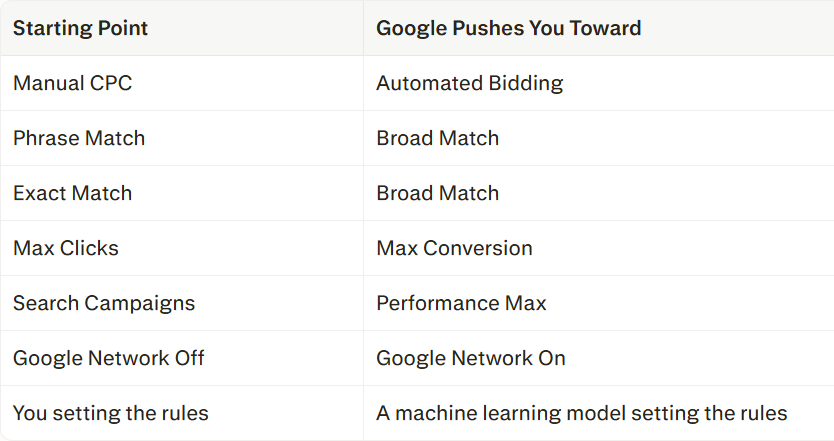
Most of Google's suggestions move you in the same direction: away from hands-on management and toward automation.
The trade is the same every time: less control for you, more decisions handed to Google's system.
The pitch behind each switch is some version of: "Let our AI find opportunities you'd miss on your own."
One specific case worth flagging: For small accounts, the Max Clicks to Max Conversion recommendation often backfires. If your account generates fewer than 30 conversions a month, Google's system doesn't have enough data to optimize well. We've consistently seen better performance by staying on a bidding strategy that gives us more control — and ignoring that recommendation entirely.
The Performance Max Reality Check
Performance Max isn't uniformly good or bad — it depends heavily on budget and business type.
In practice, it tends to perform well for product-based businesses running healthy budgets, generally $2,000 a month or more, where there's enough conversion data for Google's system to identify real buyers across its full network of placements.
For local service businesses on smaller budgets, the experience is usually different. Traditional Search ads using RSAs (Responsive Search Ads — the standard text ads that appear in search results) give you far more control over who sees your ad and when. PMax's reach across YouTube, Display, and Gmail comes with a real tradeoff: more impressions, but a much higher share of clicks from people who were never going to convert.
That's the actual cost of PMax at lower budgets — not just more spending, but paying for a lot of non-converting exposure before the system finds the clicks that matter.
For smaller, service-based accounts, this typically means:
Lower conversion rates
Higher cost per lead, especially below that $2,000 monthly threshold
Lower lead quality from clicks Google's AI decided were "close enough"
Less visibility into what's actually working, since automation obscures most of the decision-making
The Budget Increase Cycle
Here's the pattern that typically follows when a business applies Google's recommendations wholesale. Performance gets less efficient. Then new recommendations appear to fix it:
Increase your budget
Raise your Target CPA
Increase your bids
Expand targeting
Turn on more automation
Notice what's happening: the recommended fix for declining efficiency is almost always more spending. Google rarely says "spend more money" outright, but that's consistently where the recommendation chain leads.
In my experience — managing accounts since 2000 across manufacturing, healthcare, home services, retail, legal, and professional services — cleaning up and properly restructuring an account typically reduces CPC by around 30 percent. Some clients pull back their budget and keep the difference. Others maintain the same spend and use the improved efficiency to buy more impressions and more conversion opportunities. Either way, the lever that moves the number is how well the account is built and managed — not how much goes into it.
What a Skilled PPC Manager Actually Does
A good PPC manager doesn't open the account asking "How do we get more traffic?" They ask "How do we get more value out of the traffic we're already paying for?"
That's a fundamentally different starting point. In practice, it means improving performance by:
Cutting search terms that spend money without producing leads
Tightening who sees your ads
Fixing conversion tracking so you actually know what's working
Refining audience targeting
Identifying where budget is leaking out with no return
Making ads more relevant to what people are actually searching for
Improving the landing page experience after the click
Choosing the right ad format — RSA or PMax — based on your actual budget and business model, not Google's default recommendation
These changes often improve results without spending an additional dollar. In many cases, accounts end up generating more leads and better ROAS on the same budget. Sometimes spend goes down while results improve.
More Control Isn't Outdated
Google — and plenty of people without deep PPC experience — frames manual, hands-on management as old-fashioned. That's a sales pitch, not sound strategy.
Automation is a tool. It isn't a strategy. The accounts that perform consistently well combine automation with an experienced person watching, testing, adjusting, and choosing the right ad type for the budget in front of them.
The right question isn't "How fast can I enable Google's latest recommendation?" It's "Will this actually make my account more profitable, or will it just make it busier?"
More clicks, more impressions, and more automation aren't the goal. A better ROI is.
Related: Google Ads Auto-Apply Recommendations: Convenience or Costly Mistake?
Quick Glossary
Auction — The real-time process Google runs each time someone searches, deciding whose ad shows and at what position.
Auto-Apply — A Google Ads setting that activates certain recommendations automatically, without asking first.
Automated Bidding — Letting Google's software set your bids based on your goals, rather than setting them yourself.
Bid — The amount you're willing to pay when someone might click your ad.
Broad Match — A keyword setting that shows your ad for a wide range of related searches, not just your exact phrase.
Conversion — The action you want a visitor to take after clicking your ad — a purchase, form submission, call, or similar.
Conversion Rate — The percentage of clicks that result in a conversion.
Conversion Tracking — The setup that tells you which clicks led to a conversion, so you know what's working.
CPC (Cost-Per-Click) — What you pay each time someone clicks your ad.
Exact Match — A keyword setting that shows your ad only for your precise search term or very close variations — the tightest control available.
Google Network — An option that lets your search ads also appear on partner sites and search engines beyond Google.com. Can dilute traffic quality when left on by default.
Impressions — The number of times your ad is shown, regardless of whether anyone clicks.
Keyword Matching — The rules that determine which searches trigger your ad, based on the keywords you've chosen.
Landing Page — The page a visitor sees after clicking your ad.
Lead Quality — How likely a lead is to become a paying customer, not just a form submission.
Manual CPC — A bidding method where you set each bid yourself.
Max Clicks — A bidding strategy that tells Google to get as many clicks as possible within your budget, regardless of whether those clicks convert.
Max Conversion — A bidding strategy that tells Google to maximize conversions within your budget. Requires sufficient conversion history to work reliably.
Optimization Score — Google's in-account metric that measures how closely your account follows Google's recommendations. It measures compliance, not profitability.
Performance Max (PMax) — A Google ad type that runs across Search, YouTube, Gmail, Display, and Discover simultaneously, using AI to allocate budget across placements.
Phrase Match — A keyword setting that shows your ad for searches containing your phrase in a specific order — tighter control than Broad Match.
PPC (Pay-Per-Click) — An advertising model where you pay only when someone clicks your ad.
PPC Manager — The person or team responsible for running and optimizing your pay-per-click campaigns.
ROAS (Return on Ad Spend) — Revenue earned for every dollar spent on ads.
ROI (Return on Investment) — Overall profit relative to total spend.
RSA (Responsive Search Ad) — The standard text ad format in Google search results, offering more targeting control than Performance Max.
Search Terms — The actual words someone typed into Google before your ad appeared — not always the same as the keyword you chose.
Target CPA (Cost-Per-Acquisition) — The amount you're willing to pay for each lead or sale.
Targeting — The settings that determine who sees your ad, based on location, audience, and search behavior.
